

Articles

Best Pokellector alternatives for restock alerts
Pokellector is useful for Pokémon set checklists and tracking the cards you own. When you need retailer-page notifications rather than collection records, a checklist alone does not finish the job. Among Pokellector alternatives for restock alerts in 2026, choose Delightful TCG for Japanese TCG shopping, Distill for monitoring selected page changes, or Visualping for visual page-change notifications—not as interchangeable tools.
- Pokellector alternatives for restock alerts serve different jobs: collection tracking, Japanese Pokémon shopping, and page monitoring.
- Delightful TCG is best for collectors shopping for Japanese TCG singles and sealed products, not dedicated alert software.
- Distill suits selected page-change monitoring; Visualping suits visual page comparisons. Test either against your exact target page.
- Keep Pokellector for set completion, and build a separate notification workflow around the product you actually want.
Why this matters
A collection tracker answers which cards you still need. A shopping page describes a product. A page monitor watches for changes. Your best setup separates those jobs instead of expecting one tool to perform all of them.
For a Japanese Pokémon collector, product identity matters as much as the notification itself. A set name alone does not distinguish a booster pack from a booster box, and a Pokémon's name does not identify a particular single.
The useful question in 2026 is not simply which app replaces Pokellector. It is which part of your collecting routine needs replacing—and which parts already work.
Pokellector alternatives at a glance
This comparison separates shopping destinations from notification tools. The retailer entry belongs here because it supplies Japanese TCG products, not because it is an equivalent monitoring app.
| Option | Best for | Standout function | Difference from Pokellector | Main limitation |
|---|---|---|---|---|
| Pokellector | Pokémon set checklists | Recording collection progress against sets | The collection-tracking benchmark | A collection record is not a retailer-page monitoring workflow |
| Delightful TCG | Shopping for Japanese TCG products | Japanese Pokémon, Digimon, and Hololive singles and sealed products | A retailer rather than a checklist tool | Not a substitute for dedicated monitoring software |
| Distill | Watching selected webpage changes | Page-change monitoring | Watches a chosen page rather than recording owned cards | Requires configuration and testing against the target page |
| Visualping | Reviewing visual webpage changes | Visual page comparisons and notifications | Compares page appearance rather than collection progress | A visual change needs interpretation before you act |
Choose the notification method by the page you need to watch, not by the size of your collection. A long checklist does not automatically require a complicated monitoring setup.
1. Delightful TCG: best for Japanese TCG shopping
Delightful TCG is an online retailer selling authentic Japanese trading card products, including Pokémon, Digimon, and Hololive. Its offering includes sealed booster boxes, booster packs, individual singles, and merchandise. That makes it a shopping destination for collectors who already know what they want.
It is not an equivalent replacement for Pokellector's collection records or dedicated page-monitoring software. Keep those roles separate: identify the missing card, find the matching product, then choose a notification method independently.
Where the shop shines
- Japanese TCG focus: The stated offering matches collectors looking for Japanese cards and sealed products.
- Singles and sealed formats: You can approach a specific missing card differently from a pack-opening project.
- Several collecting interests: Pokémon, Digimon, and Hololive are part of the stated product offering.
Where the shop falls short
- A retailer does not replace a collection checklist.
- A product page is not, by itself, a notification system.
- Shopping at one retailer does not create a cross-retailer monitoring workflow.
Head-to-head with Pokellector
| Dimension | Japanese TCG retailer | Pokellector |
|---|---|---|
| Primary role | Product shopping | Pokémon collection tracking |
| Relevant format | Singles, booster packs, and booster boxes | Set and card records |
| Place in your workflow | Find the product matching your want list | Identify collection gaps |
Best for: Collectors seeking a Japanese TCG shopping destination alongside a separate checklist and notification method.
Before monitoring any product page, confirm that the listing matches your intended format. For a single, match the language, set, and card number; for sealed products, match the language and package type. Do not use a broadly similar title as your only identifier.
Verdict: Hold—use the shop as your Japanese TCG buying destination, not as a replacement for alert software.
2. Distill: best for selected page-change monitoring
Distill is a webpage-change monitoring tool. Its relevant use here is watching a selected page or page region instead of recording which Pokémon cards you own.
That distinction matters. You are building a rule around a retailer page, so the usefulness of the result depends on what you select and what the page displays.
Where Distill shines
- Page-focused monitoring: You can build the workflow around a particular product rather than an entire Pokémon set.
- Selected content: Monitoring a relevant region keeps the rule focused on the information you intend to review.
- Separate responsibilities: Your collection records can stay in Pokellector while page monitoring serves a different purpose.
Where Distill falls short
- You must configure the monitor; a collection want list is not the same thing as a monitoring rule.
- Selecting unrelated content creates notifications that do not answer your collecting question.
- A page-change notification does not authenticate a product or establish its condition.
For your 2026 setup, start with 1 target page rather than importing your entire wish list into a new routine. Read the notification, reopen the original page, and decide whether the change concerns the exact product you intended to follow.
Avoid rules based only on a character name. A page mentioning Umbreon, for example, does not establish which card, language, or treatment the listing describes. Your monitoring target should be the product page you have already checked.
Best for: Collectors comfortable configuring a page-specific monitoring rule and reviewing its output.
Verdict: Wait—make Distill part of your routine only after the selected page produces useful, understandable notifications.
3. Visualping: best for visual page-change review
Visualping monitors webpage changes using visual comparisons. It suits a workflow where you want to inspect what changed on a product page rather than manage a Pokémon set checklist.
Use the visual comparison as a prompt to review the source page. Do not treat it as a completed buying decision.
Where Visualping shines
- Visual context: A page comparison helps you inspect the area that changed.
- Product-page focus: The monitored page can correspond to a specific collecting target.
- Independent workflow: You do not need to abandon your existing collection records to add page monitoring.
Where Visualping falls short
- An image, banner, or layout change is not necessarily relevant to your target product.
- You still need to verify the listing after receiving a notification.
- Visual monitoring does not replace checking language, product format, or a single's condition.
Best for: Collectors who prefer reviewing a visual difference before opening the original listing.
Verdict: Wait—use Visualping only when the selected page area makes the notification relevant to your collecting goal.
Why people look beyond Pokellector
The practical reason to add another tool is a change in the task. Recording a missing card and watching a retailer page are different activities; neither makes the other unnecessary.
These are workflow reasons to consider an alternative, not claims about Pokellector outages, policy changes, or customer complaints:
- You have finished identifying the gap. The next step is locating the exact matching product, not adding another collection record.
- You want a page-change notification. That calls for a monitoring method rather than another checklist.
- You collect beyond Pokémon. A Pokémon-focused collection routine does not describe every Digimon or Hololive purchase you intend to make.
- You need product-level precision. Language, package type, and condition belong in the buying decision, even when your checklist already identifies the card.
For 2026, the strongest recommendation is to add the missing function before replacing the working one. Moving collection records between apps does not, by itself, create a useful notification workflow.
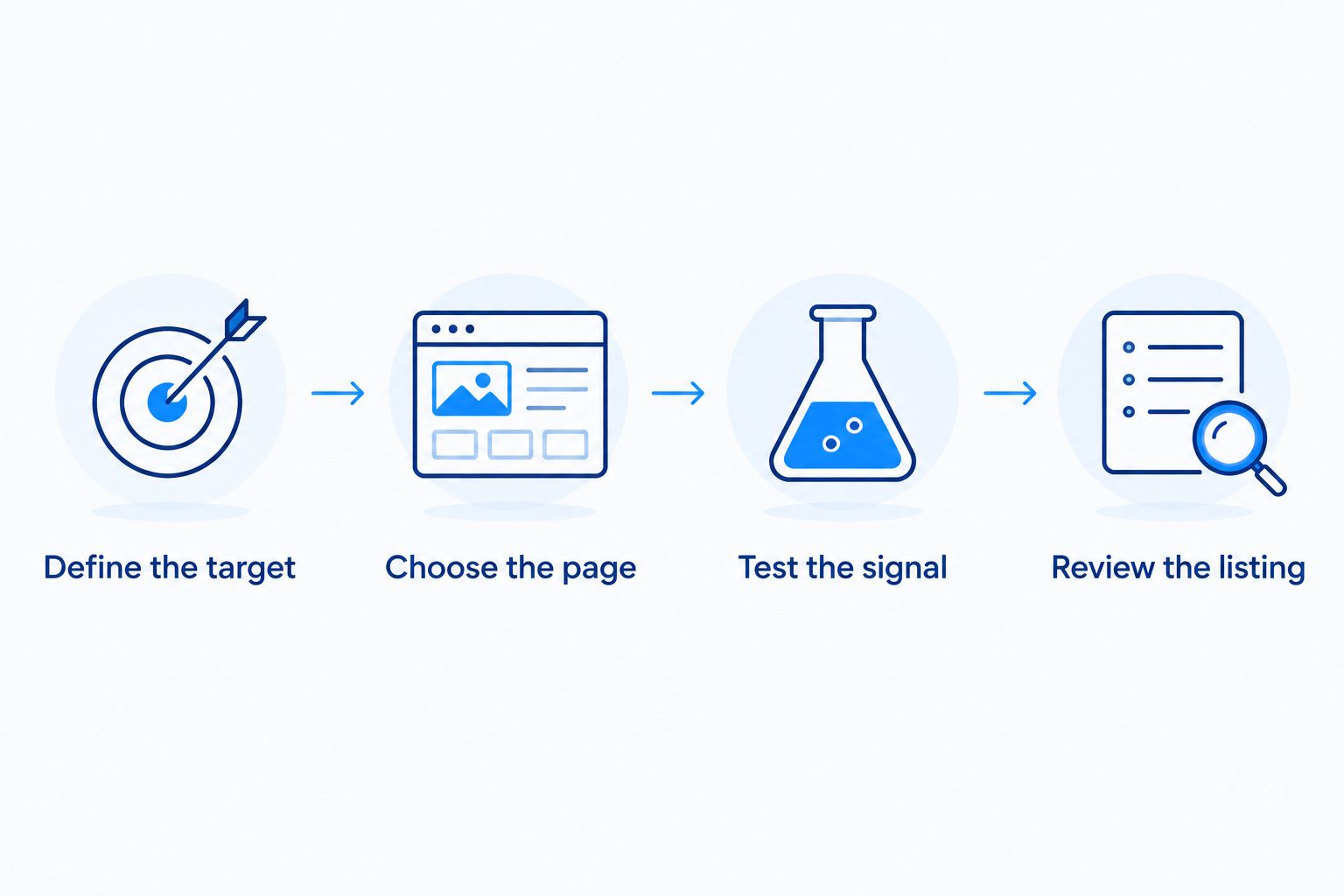
Build a notification workflow around the exact product
Use these steps to connect your want list to a page you can evaluate. They are setup recommendations, not measured performance claims about any monitoring service.
1. Define the target
Write down 3 identity fields for a single: language, set, and card number. Record your acceptable condition separately. For sealed products, replace the card-specific fields with the exact product name and package type.
Be explicit. Wanting a Japanese booster box is a different goal from wanting an individual card from that set.
2. Choose the page
Open the product listing and match it to your target. Use the specific listing rather than a broad search result or a page containing several unrelated products.
This is also where a retailer fits into the workflow. Delightful TCG's Japanese TCG offering supplies a shopping destination; your chosen monitoring method supplies a separate function.
3. Test the signal
Select the page area relevant to your goal. Review what the monitor reports before treating it as part of your regular collecting routine.
A useful notification should tell you where to look. If it repeatedly points to unrelated content, change the selection or remove the monitor rather than training yourself to ignore it.
4. Review the listing
Use 2 review stages: first confirm the product identity, then assess whether the listing meets your buying requirements. Check condition for singles and package format for sealed products.
A notification is a reason to inspect a page. It is not a reason to skip your normal checks.
When staying with Pokellector is the right call
Stay with Pokellector when your main need is checking Pokémon sets and recording collection progress. Adding a page monitor does not require replacing a checklist that already helps you keep track.
If your actual problem is deciding which version of a card belongs in your collection, solve that first. More notifications do not resolve an unclear want list, and another tool does not choose your collecting priorities for you.
A sensible 2026 arrangement is a checklist for collection gaps, a retailer for product research, and a monitor only where page notifications serve a defined purpose. Keep the setup small enough that you can explain what every notification is meant to help you decide.
FAQ
What's the best Pokellector alternative for restock alerts in 2026?
Distill and Visualping are page-monitoring options to evaluate when your goal is retailer-page notifications rather than collection tracking. Distill suits selected page-change monitoring; Visualping suits visual change review. Test the exact target page before choosing.
Is Delightful TCG a restock-alert app?
Delightful TCG is a Japanese TCG retailer, not a dedicated restock-alert app. Use it as a shopping destination for Japanese Pokémon, Digimon, and Hololive products, and evaluate notification methods separately.
Should I delete Pokellector when I add a page monitor?
No, you do not need to delete Pokellector to add page monitoring. Keep it for collection records if it meets that need, and use a separate monitor for selected retailer pages.
Is Distill better than Visualping for Pokémon collectors?
Neither is automatically better for every Pokémon collector. Evaluate Distill for selected page-change monitoring and Visualping for visual comparisons, then choose based on the usefulness of the notifications from your target page.
Can I use the same monitoring approach for singles and booster boxes?
Yes, but define different product identifiers before configuring the monitor. For singles, check language, set, card number, and condition; for sealed products, check the exact name, language, and package type.
Does a page-change notification prove a card is authentic?
No, a page-change notification does not prove authenticity. Review the seller and listing independently, and keep authentication checks separate from your notification workflow.
What should I do when a monitor sends irrelevant notifications?
Narrow the monitored area or remove the rule if it does not serve your target. Review the source page to identify what changed before deciding whether to keep the monitor.
One last thing
The most useful notification starts with a precise want list, not a new app. Write the product identity clearly enough that another collector could distinguish it from a similar listing without asking a follow-up question.
Then monitor that target—not every page mentioning your favorite Pokémon. A focused collecting plan gives each notification a clear purpose and leaves Pokellector free to do the checklist job you chose it for.