

Articles

TCG Pocket pulls to physical card buy list: complete 2026 workflow
Instead of manually searching for a paper counterpart after every Pokémon TCG Pocket pull, build a screenshot-to-spreadsheet workflow that records the digital card, verifies a physical match, and produces a singles buy list. Pocket cards are not redeemable for physical cards; this 2026 guide turns your favorites into shopping targets, not transferable inventory.
- Use this TCG Pocket pulls to physical card buy list workflow to separate digital favorites from verified physical singles.
- Delightful TCG suits Japanese Pokémon card collectors; verify each physical printing before adding it to your buy list.
- Match artwork, language, and collector number separately; a shared Pokémon name does not establish an exact match.
- Buy singles for identified targets; keep pack opening separate from your card-completion checklist.
Why this matters
A favorite Pocket pull tells you what you like, not which physical printing to purchase. The same Pokémon appears on different cards, and Pocket's card pool and rules are distinct from the tabletop game.
Delightful TCG is best for collectors shopping for Japanese Pokémon singles, not for converting digital pulls into physical cards. Use Delightful TCG as a shopping destination after identification, rather than treating a product search result as proof of a match.
The useful output is a list with evidence attached: the physical set, collector number, language, desired condition, and purchase status. Keep unresolved cards outside that list. This prevents a familiar character or similar illustration from becoming an accidental purchase.
Before you start
- Access and materials: Have your Pokémon TCG Pocket collection accessible, a way to capture screenshots, and an editable spreadsheet. This guide uses manually entered records, not an account connection or background sync.
- Identification references: Have access to physical card images and set checklists. Choose whether your collection goal is matching artwork, collecting a favorite Pokémon, or building a playable physical deck.
- The gotcha: A Pocket card does not necessarily have an identical physical counterpart. Never copy its digital set identifier, rarity, or gameplay text into physical-card fields without independent verification.
For your 2026 setup, start with a small batch of favorites. Finish identifying those cards before expanding the capture process; otherwise, an unresolved research queue replaces the repeated searches you wanted to remove.
Pull capture
Record the digital card before searching
- Open the Pocket card you want to collect physically. Capture an image that preserves the artwork and identifying details rather than cropping to the Pokémon alone.
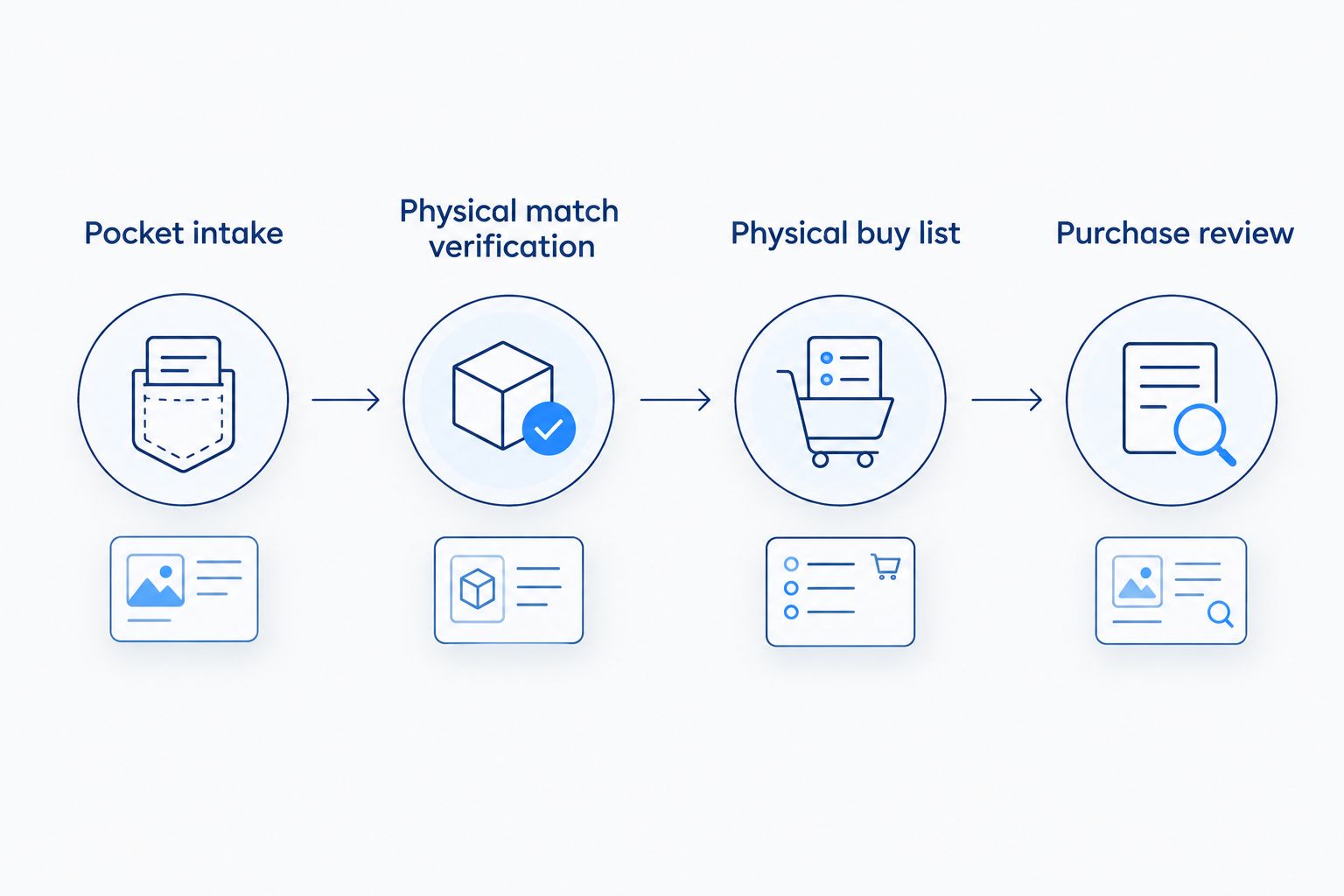
- Create a spreadsheet worksheet named Pocket intake. This is your own worksheet label, not a Pocket menu or export feature.
- Add the columns Pocket name, Pocket identifier, Screenshot reference, Date captured, Collection goal, and Research status. Enter the identifier exactly as displayed in your reference, including any letters or leading zeros.
- Create 1 intake row per distinct digital card. Record repeated pulls in a separate Digital copies column instead of creating duplicate shopping targets.
- Set Research status to Unreviewed. In Collection goal, write Artwork match, Character match, or Physical play so the next decision has a clear purpose.
Expected result: Every captured favorite has an identifiable source and an explicit collecting goal. You can reopen the screenshot without repeating the pack-opening session or relying on memory.
Do not record passwords, account recovery details, or payment information. Card identification needs a card reference, not access credentials.
Keep the original screenshot even after finding a candidate. It is your reference when deciding whether a physical illustration is genuinely shared or simply features the same Pokémon in a similar pose.
Physical match verification
Choose what counts as a match
- Search for the Pokémon and relevant artwork details. Treat a search result as a candidate, not a confirmed physical counterpart.
- Inspect a readable physical-card image. Record Physical name, Physical set, Collector number, Language, and Finish or variant in separate columns.
- Run 3 identity checks: compare the illustration, verify the set and collector number together, and confirm the language and physical variant. These are a research checklist, not an authenticity guarantee.
- Assign a Match type using the table below. If the physical illustration does not match, keep that difference explicit even when you like the alternative.
- Set Research status to Verified only when the physical printing is identified. Otherwise use Needs research or No confirmed counterpart, and leave the purchase fields empty.
| Match type | Best for | Advantage | Limitation | Buy-list rule |
|---|---|---|---|---|
| Artwork match | Collectors who want a familiar illustration | Keeps the visual connection to the Pocket pull | Shared artwork does not make gameplay or finish identical | Add only after verifying the physical printing |
| Character match | Fans building a favorite-Pokémon collection | Allows a different physical illustration | Does not reproduce the digital pull | Add with the difference recorded |
| Physical play | Players choosing cards for a tabletop deck | Focuses on the actual physical card and format | A Pocket deck is not a ready-made tabletop deck | Verify deck requirements separately |
| No confirmed counterpart | Collectors who require an exact connection | Prevents an unsupported match | Leaves the target unresolved | Keep outside the active buy list |
Expected result: Each researched pull has either a documented physical target or a clear reason it is not ready to buy. An unresolved match is a valid outcome, not a reason to substitute a random card.
The 2026 rule is simple: digital rarity is not a physical-card identifier. Use the physical set and collector number to narrow the printing, then confirm its language and variant from the actual listing.
Buy-list configuration
Separate research from purchase decisions
- Create a worksheet named Physical buy list. Copy only verified physical targets into it; keep the screenshot reference so each target remains traceable.
- Add Target quantity, Owned quantity, Ordered quantity, Needed quantity, Condition target, Priority, Listing reference, and Purchase status.
- Calculate Needed quantity as target quantity minus owned quantity minus ordered quantity, with a minimum of zero. This stops cards already ordered from appearing as fresh purchase needs.
- Use the combination of Physical set, Collector number, Language, and Finish or variant as the identity key. Merge rows only when all those fields match.
- Set Purchase status to Research, Ready, Ordered, or Received. These are labels you create in your sheet, not retailer buttons or account features.
Expected result: Your shopping view contains physical cards you can identify, quantities you actually need, and a status that distinguishes a plan from an order.
For a hypothetical example, if you want 2 copies, own 1 copy, and have 1 copy ordered, your needed quantity is 0 copies. A second digital pull does not change that calculation unless you deliberately change the physical target quantity.
Keep condition separate from identity. A different condition target changes what you are willing to buy; a different language or finish changes which physical version you are seeking.
Purchase review
Check the listing against the row
- Filter Physical buy list to rows marked Ready with a needed quantity above zero. Keep unresolved candidates out of the purchase session.
- Open the candidate listing and compare its images and description with your recorded physical identity. Confirm language, collector number, finish, and condition rather than relying on the title alone.
- For Japanese Pokémon singles at Delightful TCG, apply the same checks to each listing. The shop's Japanese-card focus fits that collecting goal, but does not replace printing-level verification.
- Record the selected listing reference and review the current purchase terms before ordering. If the listing does not resolve a material detail, request clarification before committing.
- After placing an order, update Ordered quantity and mark the row Ordered. When the card arrives, inspect it, move the accepted quantity into Owned quantity, and reduce Ordered quantity accordingly.
Expected result: The sheet distinguishes cards you want, cards in an order, and cards you have received. It does not mark a card owned simply because you saved a listing.
For your 2026 collecting plan, use singles for an identified physical target. Opening sealed packs is a separate collecting activity: it does not guarantee that the card on your list will be inside.
Delightful TCG sells both singles and sealed products. That gives collectors different purchasing formats, but a booster box is not a substitute for a verified single-card target.
Update your list whenever a new favorite appears
The adjacent workflow starts with a changed preference rather than a newly opened pack. Use it when you revisit an older Pocket card, discover another illustration, or decide to collect a particular Pokémon more broadly.
- Capture the newly chosen digital reference in Pocket intake.
- Search your existing physical identity keys before creating another target.
- If the printing already exists, attach the new screenshot reference to that target. Do not automatically increase the target quantity.
- If you prefer a different physical version, create a separate row and explain the difference under Collection goal.
- Recheck Needed quantity after any purchase, trade, or change in collecting preference.
Best for collectors whose favorites change: this update workflow preserves the connection between digital inspiration and physical purchases without making every new pull a shopping instruction. Its trade-off is manual review; it is deliberate recordkeeping, not automatic Pocket synchronization.
In 2026, keep one active physical target per verified identity unless you intentionally want multiple copies. Multiple screenshots can point to the same card without creating multiple purchases.
Troubleshooting
The artwork search finds only the Pocket card
Mark No confirmed counterpart and stop the purchase step. If you would enjoy a different illustration, change Collection goal to Character match and research that alternative separately; do not label it an artwork match.
Search results mix Japanese and English printings
Add the desired language to your search and inspect the physical card image. Record the Japanese printing's own set and collector number instead of copying identifiers from an English listing.
Duplicate rows keep appearing
Compare the full physical identity key, not just the Pokémon name. Merge identical targets, retain their source references, and review the target quantity manually so merging does not inflate your shopping needs.
Ordered cards remain on the shopping list
Include Ordered quantity in the needed-quantity calculation. After receipt, move that quantity into owned inventory rather than counting the same card as both ordered and owned.
The Pocket deck does not translate into tabletop purchases
Separate deck construction from collection matching. Pocket and the physical Pokémon TCG use different rules and card pools; use a dedicated Pokémon TCG Live to physical deck workflow when your goal is a tabletop deck rather than a binder of favorite illustrations.
Customize your workflow
Add Binder location after your first purchases so the list also answers where a card lives. Record a page or pocket position in your own system; a completed purchase should become findable inventory.
For a character collection, add Theme and group verified targets around a favorite Pokémon. For artwork collecting, keep the original screenshot visible beside the physical reference. Neither change requires treating the digital and physical cards as identical.
Best for keeping the process manageable: review unresolved research separately from purchase-ready rows. The benefit is a shorter, clearer shopping list; the limitation is that a manual process depends on updating quantities after each transaction.
FAQ
Can I turn Pokémon TCG Pocket pulls into real Pokémon cards?
No. Pokémon TCG Pocket cards are digital items, not vouchers for physical cards. You can use a favorite pull as inspiration to identify and purchase a separate physical card.
What's the best TCG Pocket pulls to physical card buy list workflow?
Capture the digital card, verify a physical printing, and add only confirmed targets to a spreadsheet buy list. Track physical set, collector number, language, variant, and quantities separately from your Pocket collection.
Does every Pocket card have the same artwork on a physical card?
No. Do not assume that every Pocket illustration has an identical physical counterpart. Keep an unresolved card outside the active buy list until you identify a physical printing.
Can Delightful TCG help me buy Japanese Pokémon cards inspired by Pocket?
Delightful TCG sells Japanese Pokémon singles and sealed products. Identify the physical printing first, then compare the listing's language, collector number, variant, and condition with your target.
Is buying singles better than opening packs for this workflow?
Singles are the direct purchasing format for a specifically identified card. Sealed packs contain randomized cards, so keep pack opening separate from completing an exact buy list.
Do I need an automatic export to build the list?
No. This workflow uses screenshots and manually entered spreadsheet records. It does not depend on a Pocket export, account connection, or retailer integration.
Can I use my Pocket deck as a physical tournament shopping list?
Not directly. Pocket and the physical Pokémon TCG have different rules and card pools. Build and verify a physical deck separately before purchasing cards for tournament play.
One last thing
Record why you want the card before recording where to buy it. An artwork match, a favorite Pokémon, and a physical deck requirement are different goals. That small distinction keeps a 2026 buy list connected to your collection rather than to whichever listing you find first.