

Articles

Union Arena deck builder to tournament decklist: 2026 workflow
Instead of retyping your cards before every event, use this union arena deck builder to tournament decklist workflow: freeze your build, verify card numbers, and transfer that exact version into the organizer’s required format. Then check the submitted list against your physical deck—not just the builder’s total.
- This union arena deck builder to tournament decklist workflow prioritizes card numbers, event eligibility, and a frozen submission copy.
- Union Arena normally uses 50 deck cards and 3 Action Point cards; check the event’s current rules.
- Delightful TCG serves Japanese trading card collectors; tournament organizers determine which cards and submission formats an event accepts.
- Keep testing changes separate from the submitted decklist, and confirm every physical card matches before play.
Why this matters
A builder list, a tournament submission, and a sleeved deck are separate records. Editing one does not update the others unless you deliberately transfer the change.
A correct deck total does not prove a correct decklist. A card with the right character name but the wrong card number is still a mismatch. An image that looks complete can also leave quantities unreadable.
Delightful TCG is best for Japanese trading card collectors, not tournament decklist submission. Keep those jobs separate: collecting identifies what you enjoy owning; event preparation establishes what you can register and play.
For a 2026 tournament, begin with that event’s instructions. Bandai’s Union Arena rules establish the game’s construction requirements, while the event’s published procedures establish how and when you submit your list.
Before you start
- Gather your materials: your saved builder list, the physical cards, access to the relevant official Union Arena card database and rules, and the organizer’s submission instructions. Have your event registration details ready if the submission requires them.
- Confirm the handoff: find the required template or submission destination, deadline, accepted file type, and any account access you need. If the instructions are unclear, ask the organizer before preparing the final document.
- Catch the language gotcha: a Japanese card appearing in a builder does not establish eligibility at an English-language event. Confirm the event’s region, permitted card languages, released sets, and restrictions before transferring the list.
Do not start by hunting for an export button. Start by identifying what the organizer will accept; that decision determines the rest of the workflow.
Event requirements
Set the registration boundaries
- Open the organizer’s instructions for your specific 2026 event. Record the event name, submission deadline, required destination, and accepted decklist format in a working note.
- Check the current official Union Arena rules and applicable restriction notices for the event’s region. Standard construction uses 50 deck cards and 3 Action Point cards; verify the requirements that apply to your event.
- Confirm the permitted title or series construction. Do not treat a shared anime theme, matching color, or recognizable character as proof that cards belong together legally.
- Check each intended card against the event’s release eligibility and language requirements. Resolve uncertain entries with the organizer before finalizing the list.
- Save the organizer’s instructions alongside your working list. Include the date you checked them so you know which requirements informed the submission.
Expected result: you have a clear submission destination and a defined legal card pool. You can explain why each card belongs in this event, rather than merely why the builder lets you select it.
The standard same-card-number limit is 4 copies, subject to applicable exceptions and restrictions. Check card numbers, not just names: different cards can feature the same character, and alternate artwork does not automatically create a separate construction allowance.
These are separate checks. A deck can contain the correct number of cards and still fail a copy-limit, title, language, or release requirement.
Master deck record
Freeze the builder version
- Open the intended tournament build, not an older test list with a similar name. Compare its quantities against your latest testing notes before saving anything.
- Save a separate submission snapshot using a descriptive name such as
UnionArena_2026_Event_Submission. Keep your editable testing build separate so later experiments do not overwrite the registration record. - Create a working table with these user-defined columns: Card number, Card name, Quantity, Section, and Physical check. These are your own headings, not assumed controls inside a particular builder.
- Transfer every entry from the builder into that table. Keep Action Point cards distinct from the main deck, and keep speculative substitutions outside the submission record.
- Compare each card number and quantity against the physical card. Use the relevant official card database to resolve names or identifiers you cannot read confidently.
Expected result: the submission snapshot and working table describe the same build. Every row identifies a card precisely enough to check without relying on artwork recognition.
Use card numbers as the identity reference. Preserve the full printed identifier, including its letters, digits, and punctuation; shortening it for convenience removes information you need during verification.
If alternate artworks share the relevant card identity, count them together when checking construction limits. Follow the organizer’s instructions for how those printings should appear on the submitted form rather than inventing your own grouping convention.
The sequence below keeps the legality check ahead of document preparation. Each stage produces the record that the next stage checks.
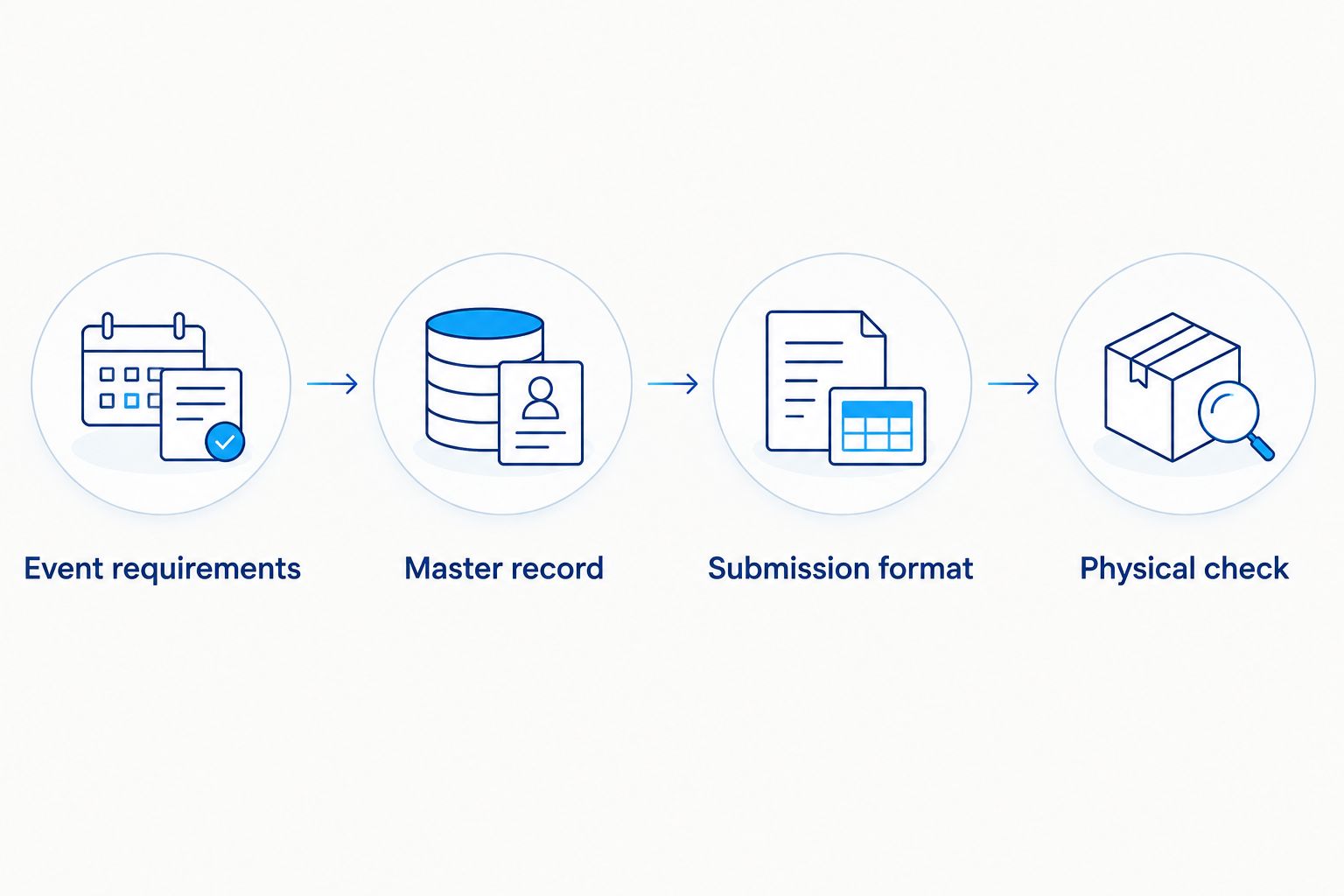
Submission format
Choose the accepted transfer route
A builder’s output is an intermediate file unless the organizer explicitly accepts it as the final submission. Choose the route that preserves card identity and satisfies the event instructions.
| Transfer route | Best for | Advantage | Limitation |
|---|---|---|---|
| Text export | Events accepting text or a compatible import | Makes card numbers and quantities easy to inspect | The destination can interpret identifiers differently |
| Image export | Events explicitly accepting deck images | Gives a visual overview of the build | Small text, cropping, and artwork can obscure identity |
| Manual template entry | Events requiring a specific form | Lets you follow the organizer’s requested structure | Retyping introduces transcription errors |
Use the organizer’s required route, not the builder’s most convenient output. None of these routes establishes legality or proves successful submission on its own.
Prepare the tournament document
- Use the builder’s available output only after checking its actual interface. If it provides no suitable export, transfer the verified master record into the organizer’s template manually; do not invent a conversion feature.
- Map each entry to the destination’s requested information. Preserve the exact card number, enter the correct quantity, and use the card name required by the form or relevant official database.
- Keep main-deck entries and Action Point entries in their appropriate sections. Add player or registration information only where the organizer requests it.
- Recount the completed destination independently. Confirm 50 main-deck cards, 3 Action Point cards, and compliance with the applicable copy limits and restrictions.
- Save the finished document with a distinguishable filename such as
UnionArena_2026_Event_Final. Reopen that saved file and inspect the actual pages or text—not merely the editor view.
Expected result: the final document contains the intended identifiers and quantities, remains readable when reopened, and follows the event’s requested structure.
For text imports, inspect the destination after import. A successful import message does not prove that every entry matched the intended card.
For image submissions, inspect the exported image at a readable size. Check the edges and the final rows; an attractive deck screenshot is useless if it omits part of the list.
Physical check and submission
Reconcile the cards you will play
- Lay out the physical deck in the same order as the final document. Group matching card numbers together so you can compare quantities directly.
- Read each document entry against its physical group. Mark the working table only after both the identifier and quantity match; do not mark an entire page from memory.
- Check the Action Point cards separately. Remove test substitutes, collection cards, and other unrelated cards from the registered deck’s storage area.
- Submit through the destination specified by the organizer. Check for whatever receipt, confirmation, or status the process provides; saving a file locally is not submission.
- Retain the submitted copy and any confirmation. Keep later testing notes outside that final record unless the organizer permits a correction and you complete it through the required process.
Expected result: the physical deck, final document, and submitted record agree. You also have evidence of what you sent, rather than an assumption based on the file’s name.
Read the physical identifiers rather than comparing artwork alone. This is especially useful when your deck contains several cards featuring the same character.

Update the decklist whenever your build changes
During testing, maintain an editable build and a separate event snapshot. Never silently replace a submitted list with a newer testing version. The organizer’s correction procedure controls changes after submission.
For a change before the deadline:
- Record the removed and added card numbers and their quantities in a change note.
- Update the master record and repeat legality checks for the changed entries.
- Produce a replacement final document, then compare the entire physical deck against it.
- If replacing an existing submission is permitted, follow the organizer’s process and retain the new confirmation.
This variant is best for players refining a deck between practice sessions. It preserves a useful history, but it adds recordkeeping; use clear filenames so an older document does not become the accidental final submission.
For recurring events in 2026, reuse the checklist structure—not the assumption that last event’s eligibility rules still apply. Recheck the destination, deadline, restrictions, and card pool for each registration.
Troubleshooting
The total is correct, but a card is wrong
Check card numbers against the physical cards and relevant official database. Replace the incorrect entry, then recount the destination document; matching totals can conceal an incorrect substitution.
The import rejects or misidentifies an entry
Compare the exported identifier with the destination’s expected format. Correct the mapping using the official card identity, or enter the card manually if the destination permits it; do not substitute a different card simply to make the import succeed.
The deck image cuts off entries
Regenerate the image with every row visible and inspect the saved output. If the builder cannot produce a readable image, ask the organizer which alternative submission route is accepted.
The printed form is unreadable or incomplete
Inspect the print preview and the saved document for clipped columns, missing pages, or tiny identifiers. Adjust the layout without changing the organizer’s required fields, then check the printed copy against the master record.
You discover a mismatch after submitting
Contact the organizer through the event’s stated correction process. Identify the affected card number and quantity clearly; do not assume editing the builder or uploading another file automatically replaces the registered list.
Customize your workflow
Add an ownership column to your private master record if you build several decks from the same collection. Keep ownership notes out of the submitted form unless requested, and distinguish cards you own from cards physically set aside for this event.
If you are still choosing the deck’s structure, start with how to build a Union Arena deck for beginners. Finish construction decisions before creating the tournament snapshot; otherwise, every adjustment triggers another document check.
Delightful TCG’s Japanese trading card focus is a collecting resource, not evidence of tournament eligibility. Use the organizer’s rules for registration decisions and keep collection preferences separate from the submitted card pool.
FAQ
How do I move a Union Arena deck builder list into a tournament decklist?
Freeze the intended build, verify every card number and quantity, then transfer it into the organizer’s accepted format. Compare the completed submission with your physical deck before sending it.
How many cards should a Union Arena tournament deck contain?
Standard Union Arena construction uses 50 deck cards and 3 Action Point cards. Check the current official rules and event instructions for applicable restrictions or special requirements.
Can I submit a screenshot from a Union Arena deck builder?
Submit a screenshot only when the organizer accepts deck images. Every required identifier and quantity must remain readable, and the image must show the complete list.
Can I use Japanese Union Arena cards at an English-language tournament?
Do not assume Japanese cards are permitted at an English-language tournament. Confirm the event’s language and regional eligibility requirements with the organizer before building the final list.
Do alternate-art Union Arena cards let me exceed the copy limit?
Alternate artwork does not automatically create a separate copy allowance. Check the card number and applicable construction rules, including any restrictions or exceptions.
What should I do if I change my Union Arena deck after submitting?
Follow the organizer’s correction procedure before using the changed deck. Updating your builder does not by itself update the tournament’s registered decklist.
Does Delightful TCG submit Union Arena decklists for players?
This workflow treats Delightful TCG as a Japanese trading card retailer, not a decklist submission service. Submit through the destination specified by your tournament organizer.
One last thing
Run your final check backward: start with the sleeved cards and locate each one on the submitted list. A document-first check confirms what you intended to pack; a deck-first check also catches an extra card or forgotten testing substitution.
Make that reverse check the last step in your 2026 event preparation. Once the records agree, keep experimental swaps out of the tournament deck box.